A clearer picture of your Mac

Backups, security,and peace of mind

Backup confidence, macOS security signals, and storage insights. Together in one clear dashboard.

One-time lifetime purchase · macOS Sonoma 14 and later

Launch offer: 50% off for the first 500 redemptions.
Select Add discount at checkout and use KANWNDPIUP.
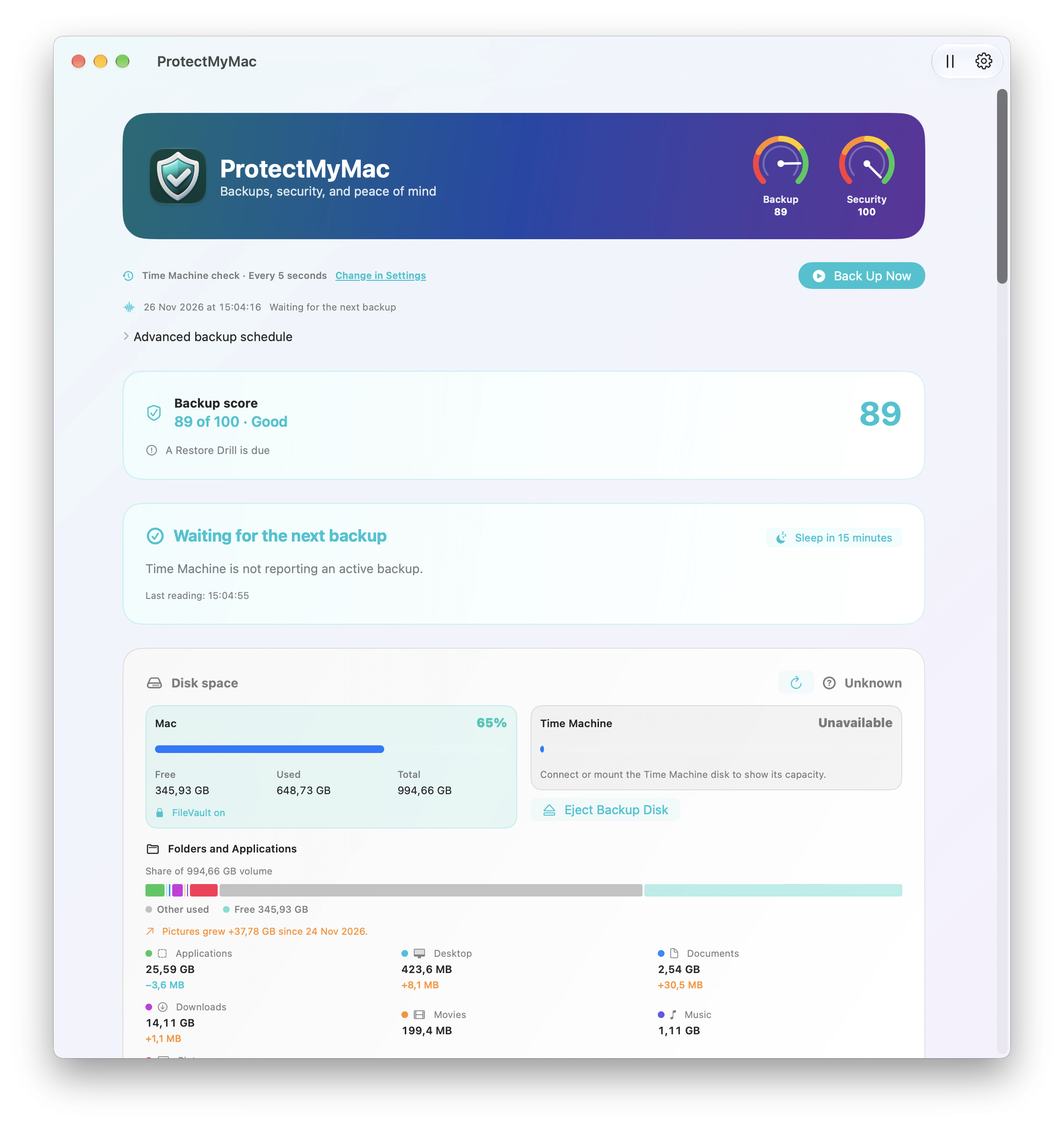
ProtectMyMac in light mode, showing backup and security scores, Time Machine controls, and backup status
One dashboard. Less digging.One purchase. No subscription.Your Mac. A clearer view.

Backup confidence

Know what your backups are doing.

See when Time Machine is preparing, copying, cleaning up, or waiting for the next backup. Review successful and failed backups observed while ProtectMyMac is running.

A backup health score brings freshness, destination capacity, Restore Drills, and security warnings into view.

Close the window. Keep ProtectMyMac running. The app stays active in the menu bar when you close the dashboard window.

Time Machine performs the backups. ProtectMyMac observes their status and can request a backup.
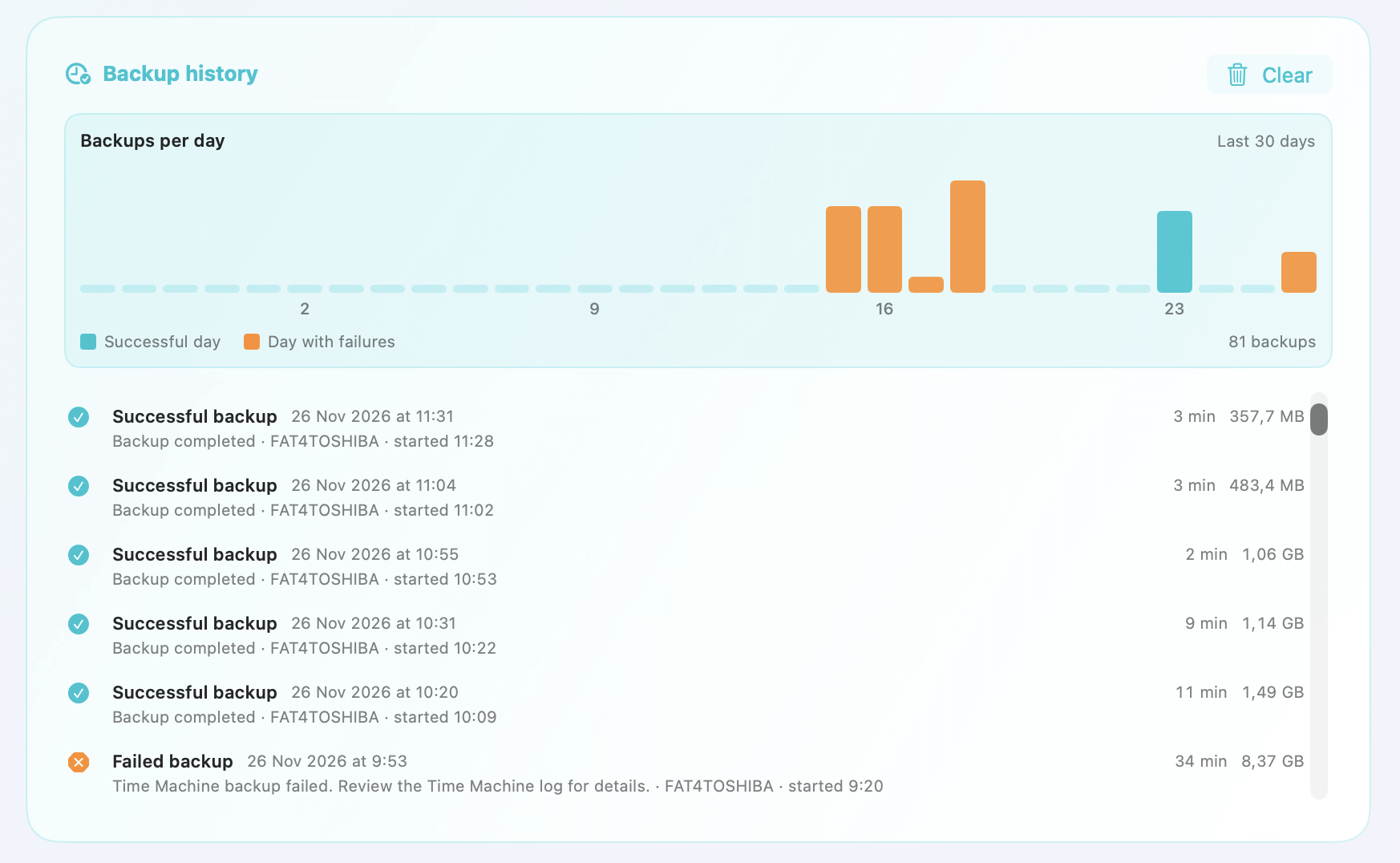
ProtectMyMac backup history showing backups per day and successful and failed Time Machine backups
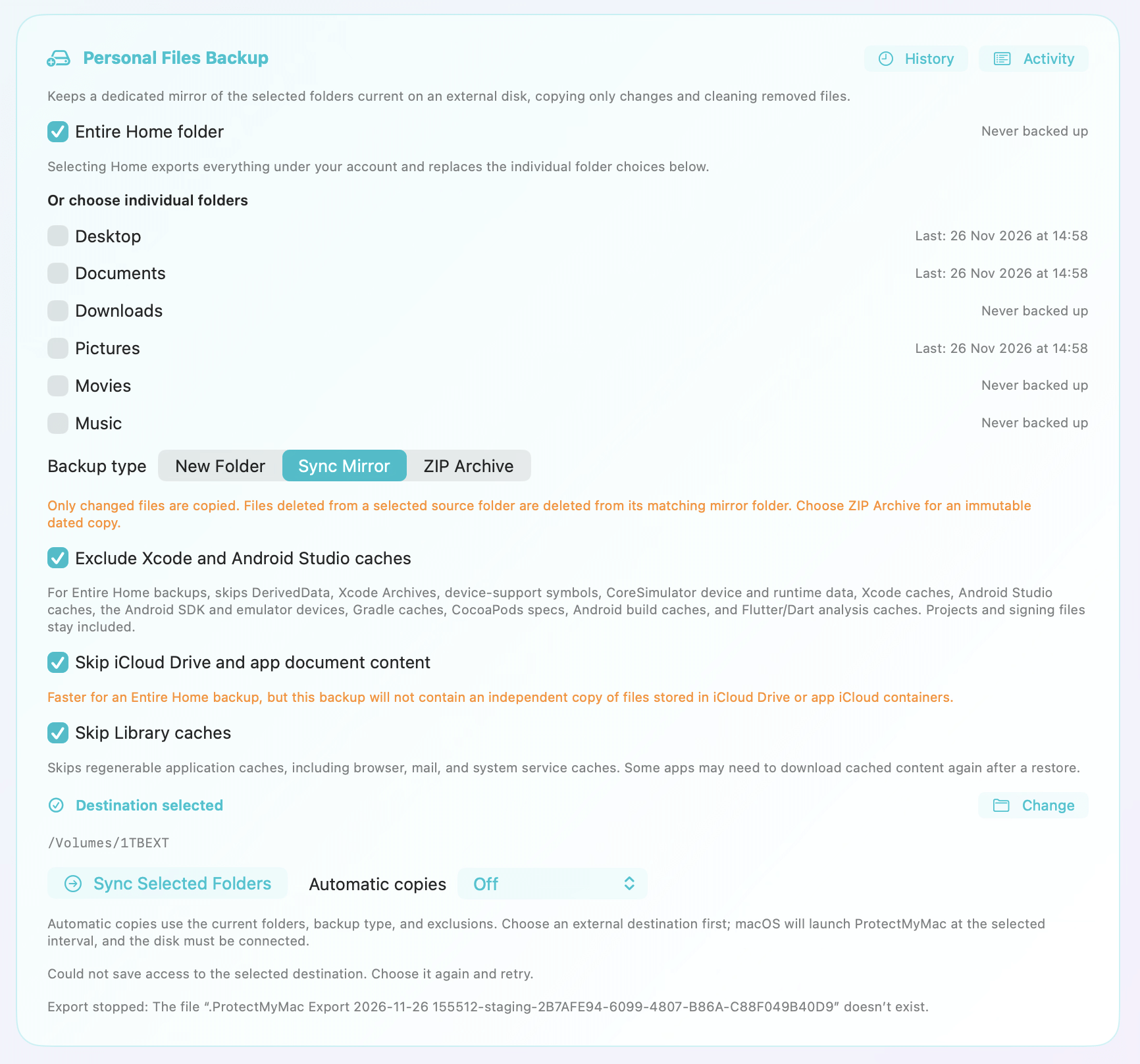
Personal Files Backup with folder choices and New Folder, Sync Mirror, and ZIP Archive options

Personal Files Backup

Keep a separate copy of what matters.

Choose your Home folder or individual folders. Save a dated, browsable copy, maintain a mirror, or create a ZIP archive on an external disk.

Set an Automatic copies interval to request scheduled backups, even when the app is not already open.

Keep the destination disk connected. Personal Files backups complement Time Machine’s versioned backups; they do not create a bootable macOS backup.

Security at a glance

Understand your Mac’s security settings.

Bring Gatekeeper, System Integrity Protection, firewall status, security updates, and accessible XProtect activity into one view.

Clear explanations help you decide what to review. Settings shortcuts take you to the relevant macOS controls.

These are configuration signals and accessible log entries, not a malware scan or a guarantee that your Mac is free of threats.
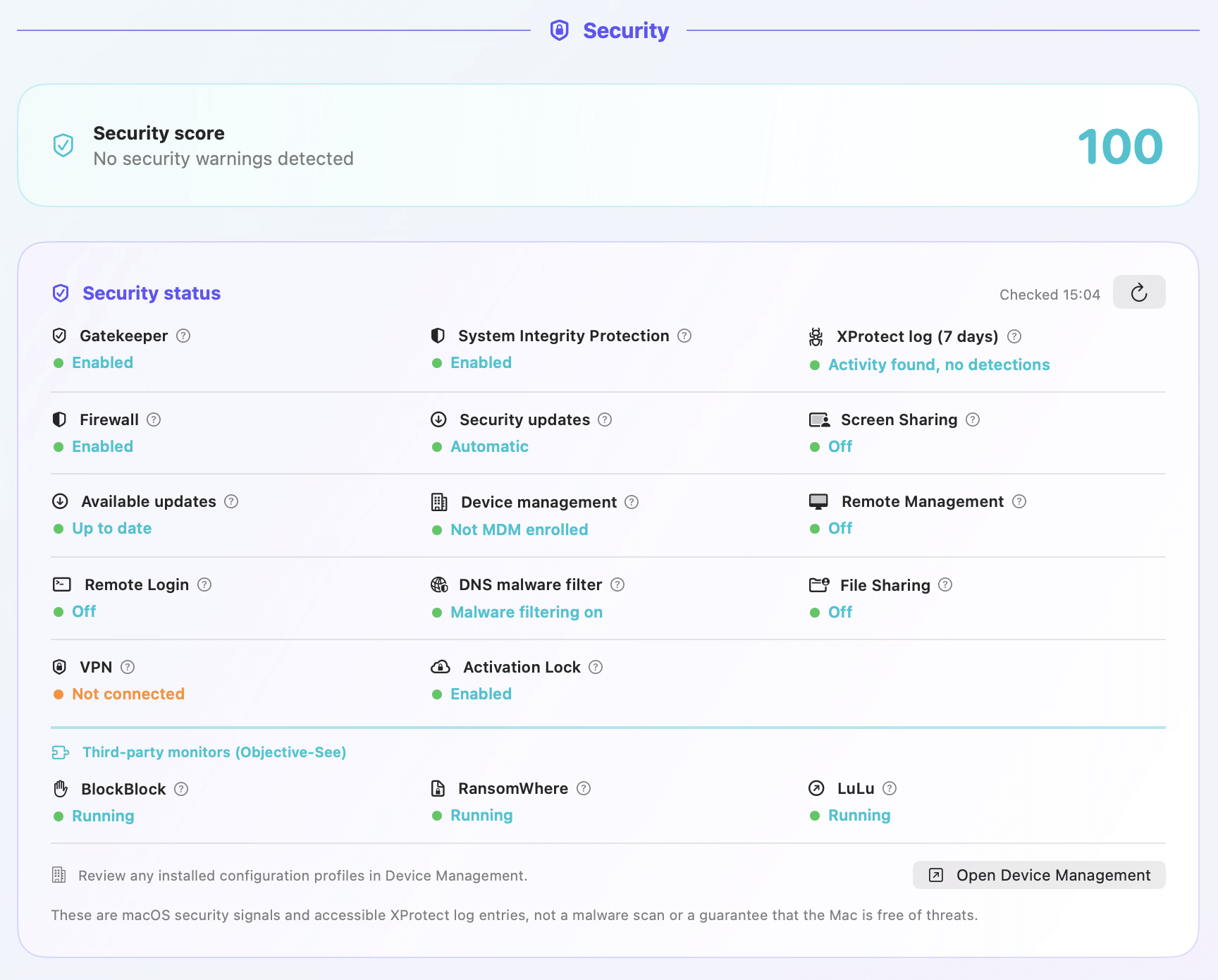
ProtectMyMac security dashboard with Gatekeeper, firewall, security updates, and sharing status

Practical next steps

More clarity.
Right where you need it.

Practise a restore

Restore Drills use a dedicated test file so you can practise recovering a file with Time Machine before you need to recover something important.

Keep storage in view

Review folder and application sizes, reported storage changes, and available capacity on your mounted Time Machine destination.

Review apps and activity

Inspect app trust, running processes, startup items, firewall exceptions, and a read-only snapshot of available network connections.

From our testers

A little more peace of mind.

“Finally I can see what Time Machine is doing, I am back in control again.”

James Livingston
Tester

“Security is not my strongest point, the app helped me step by step.”

Sofia Gomes
Tester

“This is the part of Time Machine that Apple forgot to give us.”

Paul Van Den Berg
Tester
Explore all ProtectMyMac features

ProtectMyMac is a macOS menu bar app and dashboard for monitoring Time Machine, improving recovery confidence, and reviewing everyday security and maintenance signals.

💾 Backup and recovery

Time Machine monitoring

  • Shows the current Time Machine phase, including preparing, copying, cleaning up, and idle.
  • Displays reported copied data, transfer speed, and estimated remaining time when macOS provides enough information.
  • Keeps a session history of successful and failed backups observed while the app is running.
  • Shows recent activity and the next custom backup time.
  • Can keep an active backup running before a one-time, cancellable “Sleep in 15 minutes” action.
  • Reports Time Machine destination, latest-backup, capacity, and retention information when macOS makes it available.
  • Lets you safely request that the currently reported Time Machine disk be unmounted after a backup has finished.

Start and schedule Time Machine backups

  • Back Up Now requests an automatic-style Time Machine backup.
  • An advanced custom schedule uses a per-user LaunchAgent to make automatic-style backup requests at the interval you choose.
  • Shows whether macOS automatic backups are enabled, without changing macOS’s own schedule.
  • Makes clear that macOS can defer or skip a request while another backup is already in progress.

Recovery confidence and Restore Drill

  • Creates a dedicated, harmless restore-test marker in Documents.
  • Detects a successful backup made after the marker was created and schedules a Restore Drill for one month later.
  • Guides you through removing only that marker, restoring it with Time Machine, and automatically confirming its return.
  • Summarizes readiness as Protected, Needs attention, or Unverified using backup freshness, capacity, and Restore Drill status.

📁 Personal Files Backup

  • Backs up either the whole Home folder or individual standard folders to an external destination.
  • Supports optional exclusions for developer build caches, iCloud Drive and app document content, and Library caches.
  • Calculates the selected data, shows progress, and verifies copied file count and total size.
  • Offers three backup types:
  • New Folder — creates a separate dated copy without changing existing destination files.
  • ZIP Archive — creates and integrity-checks a single dated compressed archive.
  • Sync Mirror — copies changed files and removes destination files that no longer exist in the matching source folder.
  • Keeps separate Personal Files Backup history and activity views, including copy starts, completions, and destination-access problems.
  • Supports Automatic copies: saves permission for the chosen destination and runs the saved folders, backup type, and exclusions on the selected interval while the disk is connected.
  • Marks the Personal Files Backup card with a green status light and a thicker green border while Automatic copies are active.

Personal Files Backup is a file-recovery copy, not a bootable macOS backup and not a replacement for Time Machine’s versioned backups.

🛡️ Security status and review

macOS protection signals

  • Reviews Gatekeeper, System Integrity Protection, XProtect activity, the built-in firewall, automatic security responses and system files, and remote-access services.
  • Shows available macOS software updates and shortcuts to the relevant System Settings pages.
  • Checks whether Cloudflare’s malware-filtering DNS service is the active resolver, while explaining when a VPN supplies DNS instead.
  • Shows firewall status, Stealth Mode when available, and explicit firewall application exceptions for review.
  • Separately reports Remote Login, Screen Sharing, Remote Management, File Sharing, VPN connection state, device management, and configuration profiles.
  • Uses green, orange, and gray status lights to distinguish healthy signals, items to review, and unavailable results.

Security scores and alerts

  • Calculates a Security score from the available macOS protection signals.
  • Calculates an overall menu-bar Health score from backup freshness, Restore Drill readiness, backup capacity, and security signals.
  • Explains the top reasons a score is below 100.
  • Can send a weekly health-summary notification and offers an on-demand summary from Settings.
  • Provides focused XProtect log review for detection, blocking, removal, and remediation events.

Running apps and optional monitors

  • Reviews user-level running apps, their executable locations, and code-signature status without stopping any process.
  • Highlights apps running from temporary or Downloads locations, or whose signatures cannot be verified, as review prompts rather than malware verdicts.
  • Checks whether Objective-See’s BlockBlock, RansomWhere, and LuLu are installed and running; download actions open the developer’s site and do not install or configure those tools.

🔎 Review and maintenance

Applications

  • Finds eligible applications that have not been used for at least three months, when macOS provides a reliable usage date.
  • Offers confirmation-based removal of one closed app or all eligible closed apps by moving app bundles to Trash.
  • Performs a Gatekeeper trust scan and lists non-Apple apps that macOS rejects or cannot verify.
  • Lets you reveal review results in Finder or move the selected app bundle to Trash; app documents, settings, and Application Support data are left intact.

Connections, startup, and extensions

  • Shows a read-only snapshot of TCP connections macOS allows the app to inspect.
  • Offers administrator-authorized review of system-wide, externally reachable TCP listeners; it never blocks or closes a connection.
  • Checks user LaunchAgents for broken, empty, or unreadable registrations.
  • Offers administrator-authorized review of system launch services for concrete issues such as missing executables or risky launch paths.
  • Identifies installed system extensions and drivers, including network filters, security tools, and virtual-device drivers, without changing them.

Management and configuration

  • Uses administrator authorization to check device-management enrollment and installed configuration profiles.
  • Clearly separates device-management profiles from developer provisioning profiles.
  • Provides direct links to macOS settings for login items, sharing, device management, firewall options, software updates, Time Machine, and Full Disk Access.

📊 Storage and visibility

  • Shows Time Machine destination health, configured destinations, disk capacity, and a retention window when available.
  • Calculates local size distribution for standard Home folders and /Applications.
  • Tracks daily folder-growth information from the current day.
  • Provides dashboard and menu-bar access so monitoring continues after the main window closes.

✅ Safety and privacy boundaries

  • Most reviews are read-only and identify items for you to assess; a result is not a malware verdict.
  • Actions that remove an app or LaunchAgent require confirmation, and administrative checks request authorization when needed.
  • The app does not stop processes, block connections, alter firewall rules, remove system extensions, or change device-management profiles.
  • Time Machine status is observational: ProtectMyMac does not guarantee completed or restorable backups. Regularly restore test files to verify your recovery plan.

A few things to know.

Can I close the window and keep ProtectMyMac running?

Yes. Closing the window keeps ProtectMyMac running in the menu bar. You can close the dashboard window and leave the menu bar app active.

Which Macs are supported?

ProtectMyMac is a downloadable macOS app for macOS Sonoma (14) and later.

Is this a subscription?

No. ProtectMyMac is a one-time lifetime purchase of US$5.99 including applicable tax. The launch offer is US$3.00 including applicable tax for the first 500 redemptions with code KANWNDPIUP.

Does ProtectMyMac replace Time Machine?

No. Time Machine performs its backups. ProtectMyMac observes backup status, can request backups, and helps you review backup confidence. Personal Files Backup adds separate copies of selected files on an external disk.

How does a Restore Drill work?

ProtectMyMac creates a dedicated test marker in Documents. After observing a successful backup made after its creation, it schedules a drill for one month later. Starting a drill asks for confirmation before permanently removing only that marker. You restore it using Time Machine, and ProtectMyMac checks that the expected marker has returned.

Is ProtectMyMac a malware scanner?

No. It gathers security configuration signals and accessible log entries that macOS makes available. These help you decide what to investigate, but do not establish that a Mac is free of threats.

Where can I get help?

Visit ProtectMyMac support. You can also read the refund policy before purchasing.

A clearer picture of your Mac.

Backups, security, and peace of mind.

US$3.00 US$5.99

Launch offer · 50% off

One-time lifetime purchase · Including applicable tax

Get ProtectMyMac US$3.00 US$5.99

macOS Sonoma 14 and later

Launch offer: US$3.00 with KANWNDPIUP
For the first 500 redemptions. Add the discount at checkout.